Soldering a wire to a board looks like the simplest job in electronics. It is also a common source of field failures: a joint that looks fine under a lamp can crack after a few dozen bends. The difficulty sits in surface preparation, heat control, and what happens to the wire after the iron leaves the pad. If you are still learning how parts attach to a board, a walkthrough of how to solder PCB components is a useful start.
To solder a wire to a PCB, strip the wire, clean the pad, apply flux, and pre-tin both surfaces. Then heat the wire and the pad together, feed solder into the joint rather than onto the iron tip, and hold the wire still until the solder solidifies. Solder is a weak mechanical anchor on its own, so the joint also needs strain relief.
This guide covers the full sequence, from tools and alloys to inspecting and repairing the finished joint.
When to solder a wire directly to a PCB
Direct soldering suits prototypes, repairs, and boards where the wire stays in place. It is the wrong choice when the cable is pulled, vibrated, or unplugged often.
The reason is mechanical, not electrical. A solder joint is a thin, brittle layer of metal: good at carrying current, poor at handling bending. When a wire flexes where it meets the pad, stress concentrates at the joint edge and the alloy cracks, sometimes lifting the pad with it. A connector moves that load to a housing built for it, which is why consumer devices solder a cable to a main board only when it stays there for the life of the product.
Signs that a connector is the better choice
- The cable will be unplugged during use or testing.
- The assembly sees vibration from a motor, fan, pump, or vehicle.
- The wire may be pulled or snagged during installation.
- You expect to change the board while keeping the cable.
If more than one applies, plan the mechanical retention first and treat the solder as an electrical connection only.
Tools and materials you need
You need a temperature-controlled iron, a tip that transfers heat well, suitable solder, flux, and a way to hold the board still.
A station that holds its set temperature when the tip touches copper matters more than raw wattage. A tip that cools on contact is what produces cold joints.
| Tool or material | Why it matters |
|---|---|
| Temperature-controlled soldering iron | Keeps tip temperature stable so the joint heats evenly |
| Chisel or bevel tip | Transfers heat faster than a fine conical tip |
| Solder wire, roughly 0.5 to 0.8 mm | Feeds small amounts onto a small pad |
| Flux, as a pen or gel | Removes oxide so solder wets copper |
| Wire strippers | Removes insulation without nicking the conductor |
| Isopropyl alcohol, 90 percent or higher | Cleans pads and removes residue after soldering |
| Solder wick or a solder sucker | Removes excess solder, bridges, and old joints |
| Heat-shrink tubing | Insulates the joint and supports strain relief |
Picking the right wire
Stranded wire bends better than solid wire because each thin strand carries a share of the movement, and fatigue spreads instead of concentrating at the joint edge. Solid wire inserts more easily through a plated hole and suits a connection that never moves, but it fails sooner when flexed repeatedly. A wire much thicker than the pad needs also requires far more heat, and extra dwell time is what lifts pads.
Preparing the wire and the PCB pad
Preparation decides whether the joint works. Solder wets clean metal and refuses to wet dirty or oxidized metal, so both surfaces have to be ready before the iron arrives.
Most first attempts fail here, because a pad that has sat in open air carries a thin oxide layer that solder cannot bond to.
Preparing the wire
- Strip only as much insulation as the joint needs. An over-long bare section invites a short.
- If the wire is stranded, twist the strands so they stay together and do not fan out.
- Pre-tin the stripped end. Tinning holds the strands together and cuts the time the pad has to stay hot.
Preparing the pad
- Wipe the pad with isopropyl alcohol and a lint-free swab to remove dust, oil, and old flux residue.
- If the pad looks dull, clean the oxide layer. Solder will not wet dull copper, however hot the iron gets.
- Apply flux. It lowers surface tension and helps the alloy flow across the copper instead of balling up on the tip.
How to solder wire to a PCB board, step by step
Secure the wire, heat the wire and the pad at the same time, feed solder into the joint rather than onto the tip, remove the solder first and the iron second, then leave the joint alone until it cools.
The order of the last two steps separates a clean joint from a disturbed one. Solder that solidifies while the wire is moving forms a grainy surface, and a workmanship standard treats it as a defect rather than a cosmetic issue.
Through-hole pads
A plated through-hole gives the wire a mechanical seat, which makes it the easier case. Bring the iron into contact with the tinned wire and the copper pad together so both reach temperature at once. After a second or two, feed solder into the joint where the wire meets the pad. Stop feeding, remove the solder wire, then remove the iron, and hold the assembly still for a couple of seconds.
Surface-mount pads
A surface pad has no hole and no mechanical support, and it lifts if it is overheated. Apply flux, pre-tin the pad with a small pillow of solder, and pre-tin the wire separately so the final heating step is short. Place the tinned wire on the tinned pad and touch the iron to both just long enough for the solder on each surface to melt and merge. Remove the iron and keep the wire motionless, because repeated reheating weakens the bond between the copper and the laminate underneath.
Choosing solder and flux for wire-to-board work
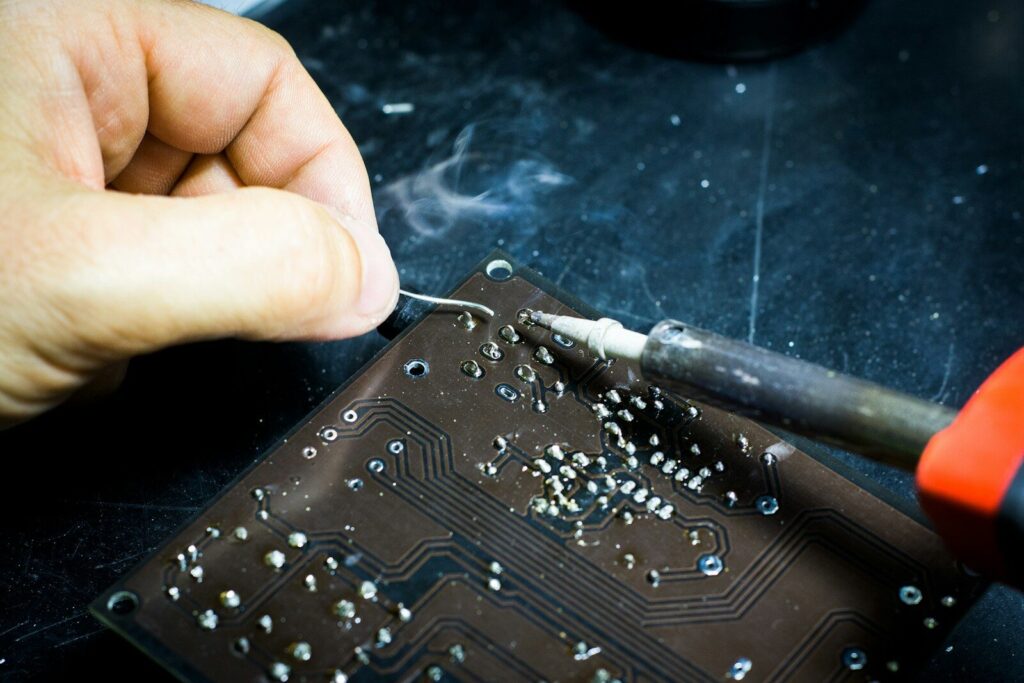
Alloy composition sets the melting point, and the melting point sets your working window. There is no single best solder, only the one that fits the board and the rules that apply to it.
Leaded eutectic solder is the most forgiving by hand. Lead-free alloys need a hotter tip and a faster hand because they resist flowing into plated holes.
Which solder alloy fits your job?
| Alloy | Melting range | Typical iron setting | Notes |
|---|---|---|---|
| Sn63/Pb37, leaded eutectic | about 183°C | 320 to 350°C | No pasty range; easiest to form and inspect |
| Sn60/Pb40, leaded | about 183 to 190°C | 320 to 350°C | Short pasty range while cooling |
| SAC305, lead-free | about 217 to 220°C | 350 to 380°C | Higher surface tension needs more heat. |
| Sn99.3/Cu0.7, lead-free | about 227°C | 360 to 390°C | Use a bigger tip, not more temperature. |
| Sn42/Bi58, bismuth | about 138°C | 230 to 260°C | For heat-sensitive parts, brittle, never mixed with leaded solder |
Give the joint enough heat to reach the alloy’s liquidus temperature, but keep the dwell short. If solder will not flow within a few seconds on a well-fluxed pad, the tip is too small for the job.
Flux types and why wetting depends on them
Flux removes the oxide layer on copper and on the solder itself, and it reduces surface tension so the alloy spreads. Rosin-based and no-clean fluxes are the usual choices for hand work, while water-soluble fluxes have to be washed off. Acid-core plumbing solder belongs nowhere near electronics.
Soldering wire to SMD pads and fine-pitch boards
A wire on a surface-mount pad has less support and less tolerance for heat than a through-hole joint, so the goal is maximum heat transfer in minimum time.
Fine-pitch boards make this harder, because the pad is small and the nearby traces are close. Three habits help:
- Lay the wire flat along the pad instead of standing it up, so bending stress runs along the laminate rather than lifting the pad.
- Pre-tin both surfaces and use one short reflow pass, because each extra pass adds heat damage without improving the bond.
- Add a drop of adhesive or a strain-relief bead over the insulation, since the pad provides no mechanical grip.
If the wire is heavy or will move, route it to a through-hole pad, a test point, or a terminal nearby instead.
Strain relief: making the joint survive movement
A joint can pass every electrical test and still fail mechanically. Strain relief moves the bending stress away from the solder so the alloy never has to absorb it.
Slide heat-shrink tubing over the joint so the wire’s bend radius starts past the solder. Anchor the insulation to the board with a dab of flexible adhesive. Leave a small service loop instead of pulling the wire tight. Once a wire becomes part of a larger wire harness, the routing path and the anchoring points carry more of the load than the joint does.
Inspecting the joint: good, acceptable, and rework
A good joint is smooth and concave, and the solder wets both the wire and the pad. Dull, grainy, cracked, or balled-up solder is not cosmetic; it is a sign the joint may not conduct reliably.
Industry workmanship standards formalize this. IPC J-STD-001, published by the Global Electronics Association, defines the materials, methods, and acceptance criteria for soldered assemblies and splits products into three classes, from consumer goods up to high-performance products where a joint failure cannot be tolerated.
| Condition | What you see | Action |
|---|---|---|
| Good | Smooth concave fillet; solder wets the wire and pad; no exposed strands | Leave it alone. |
| Acceptable but imperfect | Slightly convex, no cracks, wetted on both surfaces | Keep, but check the mechanical support. |
| Rework | Dull or grainy surface, cracked edge, solder balled on top, pad lifting | Add flux and reheat, or remake the joint. |
Inspect before you clean, because flux residue can hide a defect underneath it.
Fixing common wire-soldering problems
Most failures come down to four causes: a dirty surface, a tip that cannot deliver heat, too much solder, or movement while the joint cools. Each has a direct fix.
Solder will not stick or bead up.
If the alloy balls up and roll off the pad, the copper is oxidized or the pad is never reached to temperature. Clean the pad, apply fresh flux, and make sure the iron heats the wire and the pad together rather than the solder alone. Feeding solder onto the tip instead of into the joint is a common cause of a ball that sits on top without bonding.
Cold joints and joints that move
A cold joint looks dull and grainy. It forms when the surfaces were not hot enough or the wire moved before the solder set. Reheat the joint with flux and hold the wire still until the alloy solidifies. A joint disturbed during cooling has to be remade, not just touched up.
Too much solder, lifted pads, melted insulation, loose strands
Excess solder hides weak bonding rather than strengthening it, so remove it with wick and remake the joint with less. A lifted pad usually means too much heat or repeated rework; use a larger tip and a shorter dwell time. Melted insulation means the iron sat on the wire too long, so the fix is speed. Loose strands cause shorts and weak joints, so twist them before tinning and inspect the finished joint.
FAQ
Does wire gauge change how a wire solders to a pad?
It does, and mostly through heat. A heavier conductor absorbs more thermal energy, so the pad needs more heat to reach soldering temperature. The answer is a larger tip or a preheated board, not a higher set point, because extra temperature on a small pad is what causes damage.
Do I need to clean the board after soldering a wire?
For a quick prototype, leaving no-clean flux residue is usually acceptable. For a board that will run for years, cleaning reduces the chance that residue traps moisture or contaminants. Use isopropyl alcohol and a lint-free swab, and clean before you inspect so you can see the joint.
When should hand-soldered wire connections move to a production process?
When volume, consistency, or traceability starts to matter more than flexibility. Hand soldering is fine for prototypes and small batches, but repeatable results at scale depend on controlled processes, documented parameters, and inspection criteria.