If you opened up a smartphone, a laptop, or even a modern microwave, you would find one thing in common right away. A flat green board packed with tiny components, silver lines weaving between them like a miniature city map. That board is a printed circuit board, and it is doing something deceptively simple: moving electricity from point A to point B in exactly the right way, millions of times per second, without fail.
A printed circuit board works by using thin copper traces etched onto a non-conductive fiberglass substrate to carry electrical signals between components. Each component (resistors, capacitors, integrated circuits, and connectors) is soldered onto designated pads on the board, and the copper traces replace the tangled mess of wires that older electronics relied on. The result is a compact, reliable, and repeatable platform that routes power and data through a device according to a precise schematic.
That sounds straightforward enough, but the engineering behind it is where things get interesting. Let us walk through what a PCB actually is, how it is built, and what makes it the backbone of every electronic device you use.

What exactly is a PCB, and what does it stand for
PCB stands for Printed Circuit Board. It is a flat, rigid (or sometimes flexible) board that mechanically supports and electrically connects electronic components using conductive tracks, pads, and other features etched from copper sheets laminated onto a non-conductive substrate.
The name itself tells the story: “printed” because the circuit pattern is printed (etched or deposited) onto the board; “circuit” because the copper traces form complete electrical pathways; and “board” because it provides a physical platform. The technology replaced point-to-point wiring, where every connection was a discrete wire soldered from one terminal to another. Anyone who has looked inside a 1960s radio knows what that looked like: a chaotic bird’s nest of colored wires that was nearly impossible to troubleshoot.
A PCB is not a single piece of copper glued to plastic. It is a carefully engineered sandwich. Most consumer electronics use what is called FR-4, a flame-retardant composite of woven fiberglass cloth with an epoxy resin binder. The copper foil is bonded to one or both sides of this substrate under heat and pressure. The thickness of the copper, the number of layers, the spacing between traces, and the dielectric properties of the substrate all affect how the board performs. Engineers spend weeks on these choices before the first prototype is fabricated at a custom PCB manufacturing facility.
The physical anatomy of a printed circuit board
A PCB is built from several distinct layers, each serving a specific function. The substrate provides mechanical strength, the copper layer carries current, the solder mask protects the copper from oxidation and accidental shorts, and the silkscreen layer prints component labels and reference designators that human assemblers and inspection machines can read.
The substrate layer
The substrate is the foundation. FR-4 is the workhorse material for most PCBs under about 2 GHz, but higher-frequency applications demand something different. High-speed PCB design often uses materials like Rogers laminates, PTFE (Teflon), or ceramic-filled hydrocarbons. These materials have a lower dielectric constant and lower loss tangent than FR-4, meaning signal integrity holds up better at microwave frequencies.
The substrate thickness is not arbitrary either. Standard thicknesses include 0.4 mm, 0.8 mm, 1.6 mm, and 2.4 mm. Thinner boards bend more easily, whichis relevants for wearable devices. Thicker boards provide mechanical stability for larger components like transformers and heat sinks. The choice also affects impedance control: the distance between a trace and its reference plane (the ground or power plane) is a critical variable in determining characteristic impedance. Get it wrong, and you get signal reflections that corrupt data.
The copper layer
Copper is the workhorse conductor. Standard copper weights range from 0.5 oz/ft² (about 17 μm thick) to 2 oz/ft² (about 70 μm), though heavy-copper boards for power electronics can go up to 10 oz/ft² or more. A typical 1 oz copper trace 10 mils wide can carry about 1 ampere of current without overheating, though the exact number depends on ambient temperature, allowable temperature rise, and whether the trace is on an inner or outer layer.
Multi-layer boards stack several copper layers separated by prepreg (pre-impregnated fiberglass sheets). A four-layer board typically has the following stack:
| Layer | Function |
|---|
| Top layer | Signal routing, component pads |
| Inner layer 1 | Ground plane |
| Inner layer 2 | Power plane |
| Bottom layer | Signal routing, component pads |
Having dedicated ground and power planes does two useful things. It provides a low-impedance return path for signals (reducing electromagnetic interference), and it creates a controlled impedance environment for high-speed traces. Without planes, you would need to route every return path as a separate trace, which is both space-inefficient and electrically noisier.
The solder mask and silkscreen
The solder mask is the green coating you see on most PCBs. It is actually available in red, blue, black, yellow, and white, but green became the industry default historically because it offered the best contrast for manual optical inspection. The mask is a thin layer of polymer applied over the copper, with openings left only where components need to be soldered. It prevents solder bridges from forming between closely spaced pads during assembly and protects the copper from corrosion.
The silkscreen is the white text printed on top of the solder mask. It marks component outlines, reference designators (R1, C5, U3), test points, and occasionally company logos or revision numbers. During manual assembly, the silkscreen tells the technician exactly which component goes where. Even automated pick-and-place machines benefit from fiducial marks (small alignment targets) printed on the silkscreen layer.

How electrical signals actually travel through a PCB
Signals travel through a PCB as voltage differentials along copper traces. When a component like a microcontroller sends a signal, it raises or lowers the voltage on a specific pin. That voltage change propagates down the trace as an electromagnetic wave, reaching the destination component after a delay determined by the trace length and the dielectric properties of the substrate. The trace behaves as a transmission line, not a simple wire.
This distinction matters more than most people realize. At low frequencies (below about 50 MHz on a typical FR-4 board), a trace acts roughly like a lumped-element circuit. Resistance, capacitance, and inductance are distributed, but their effects are small enough that basic DC analysis yields acceptable results. At higher frequencies, the trace becomes a transmission line. The signal propagates as a wave, and any impedance discontinuity (a bend in the trace, a via, or a split in the ground plane) causes a partial reflection. If the reflection is strong enough, the receiver sees a corrupted signal.
Engineers manage the situation through controlled impedance routing. For a microstrip trace (a trace on an outer layer with a ground plane beneath it), the impedance depends on the trace width, the copper thickness, the dielectric constant of the substrate, and the distance to the reference plane. A common target is 50 ohms for single-ended signals and 100 ohms for differential pairs. Hitting these numbers requires careful stack-up design and consistent trace geometry.
Signal types and routing strategies
Different signals call for different routing strategies. Power traces need to be wide enough to handle current without excessive voltage drop or heating. For a 5-volt rail delivering 2 amps, a 50-mil trace on 1 oz copper might be adequate for short runs; longer runs might need 100 mils or more.
Digital signals like SPI, I2C, and UART are relatively forgiving at moderate speeds. I2C runs at 100 kHz or 400 kHz typically, so trace length matching is not a major concern. SPI at 50 MHz starts to need attention to signal integrity but is still manageable on a two-layer board with a solid ground plane.
Differential pairs (USB, HDMI, PCIe, Ethernet) require more careful attention. These signals carry data as the voltage difference between two complementary traces. The key rules: the two traces in a pair must be length-matched (typically within 5 mils for USB 2.0, tighter for PCIe Gen 3 and above); they must maintain constant spacing, and they should not cross split planes. Even a small length mismatch creates a phase skew that the receiver has to correct, eating into the timing budget.
The role of vias
Vias are the plated holes that connect traces on different layers. A through-hole via goes all the way from the top to the bottom. A blind via connects an outer layer to an inner layer but does not go through the entire board. A buried via connects two inner layers but does not reach either surface.
Each via introduces parasitic capacitance and inductance. For most low-speed designs, the effect is negligible. For a 10 Gbps signal, a single via can degrade the eye diagram enough to cause bit errors. That is why high-speed designs use back-drilling to remove the unused stub portion of a via and why HDI (high-density interconnect) boards use microvias with laser-drilled holes only 0.1 mm in diameter.
The step-by-step PCB manufacturing process
PCB manufacturing transforms a digital design file (typically Gerber format) into a physical board through a sequence of steps: inner layer imaging and etching, layer lamination, drilling, plating, outer layer imaging, solder mask application, surface finishing, and silkscreen printing.
From design file to phototool
The process starts with Gerber files. Each file represents one layer of the board: top copper, bottom copper, inner layers, solder mask, silkscreen, and drill data. These files are used to create phototools (photographic films) that act as masks during the imaging step. For a four-layer board, you might have eight or more Gerber files.
A design rule check (DRC) runs before production to catch violations: traces too close together, annular rings too small, and drill-to-copper clearance violations. Missing this step means wasting money on boards that will not work. Most PCB assembly services run DRC as part of their engineering review, but the responsibility for a clean design ultimately sits with the designer.
Inner layer processing
For multi-layer boards, the inner layers are processed first. A sheet of copper-clad laminate is cleaned and coated with photoresist, a light-sensitive polymer. The phototool is placed on top, and UV light hardens the exposed photoresist. The unexposed (soft) resist is washed away in a developer solution, leaving bare copper in the pattern of the circuit. The board then goes through an etching bath (typically ammoniacal or cupric chloride) that dissolves the unprotected copper. After etching, the remaining photoresist is stripped, leaving the copper traces.
Automated optical inspection (AOI) scans each inner layer against the Gerber data. Any open or short circuits are flagged. Minor opens can sometimes be repaired with conductive epoxy; shorts can be cut with a scalpel. More serious defects mean the panel is scrapped.
Lamination and drilling
The inner layers, prepreg sheets, and copper foil for the outer layers are stacked in the correct order and laminated under heat (around 180 degrees C) and pressure (around 300 psi) in a hydraulic press. The epoxy in the prepreg melts and flows, bonding everything into a solid board.
After lamination, the stack is drilled. CNC drilling machines spin carbide bits at 100,000 to 300,000 RPM, drilling hundreds of holes per minute. The drill files specify the X-Y coordinates and hole sizes for each via and component lead hole. Hole sizes range from about 0.2 mm for microvias to 3 mm or more for mounting holes.
Plating and outer layer imaging
The drilled holes are not yet conductive. The board goes into an electroless copper bath that deposits a thin layer of copper (about 0.5 μm) on all surfaces, including the hole walls. This seed layer is then built up to the target thickness (typically 25 μm) by electrolytic copper plating. The plating process also deposits copper on the outer layer surfaces.
Outer layer imaging follows a similar photoresist-and-etch process as the inner layers, but with an additional step: tin plating is applied to protect the copper traces before etching. After etching, the tin is stripped, and the outer layers are complete.
Solder mask, surface finish, and silkscreen
Liquid photoimageable (LPI) solder mask is applied as a liquid coating, then exposed through a phototool and developed to open windows over pads. The board is then cured in an oven.
Surface finish protects exposed copper pads from oxidation and ensures reliable solderability. Hot air solder leveling (HASL) dips the board in molten solder and blows off excess with hot air knives. ENIG (a process that deposits nickel and gold layers) deposits a nickel barrier layer followed by a thin gold layer that stays flat and oxidation-free for years. ENIG costs more than HASL but is preferred for fine-pitch components because of its flatness.
Finally, the silkscreen is applied (usually by screen printing or direct legend printing), the boards are routed or scored out of the production panel, and electrical testing verifies that the finished board matches the netlist.

Types of PCBs and when to use them
PCBs come in several categories based on construction: single-sided, double-sided, multi-layer, rigid, flexible, rigid-flex, and specialized types like metal-core, ceramic, and high-frequency boards. The choice depends on space constraints, electrical requirements, mechanical demands, and budget.
Rigid PCBs
Rigid PCBs use solid FR-4 or similar substrates and do not bend. They are the default choice for most consumer electronics, industrial controls, and automotive electronics. They offer the best cost-to-performance ratio and the widest manufacturer availability. Rigid PCB boards dominate volume production across nearly every industry.
Within rigid PCBs, layer count ranges from one to over 40. A single-sided board has copper on one side only, with components on the opposite side (through-hole) or on the same side (SMT). These show up in power supplies, LED lighting, and simple consumer gadgets. Double-sided boards have copper on both sides, connected by vias, and handle the majority of medium-complexity designs. Multi-layer boards (4, 6, 8, 12, or more layers) are needed when signal density and signal integrity requirements exceed what two layers can provide.
Flexible and rigid-flex PCBs
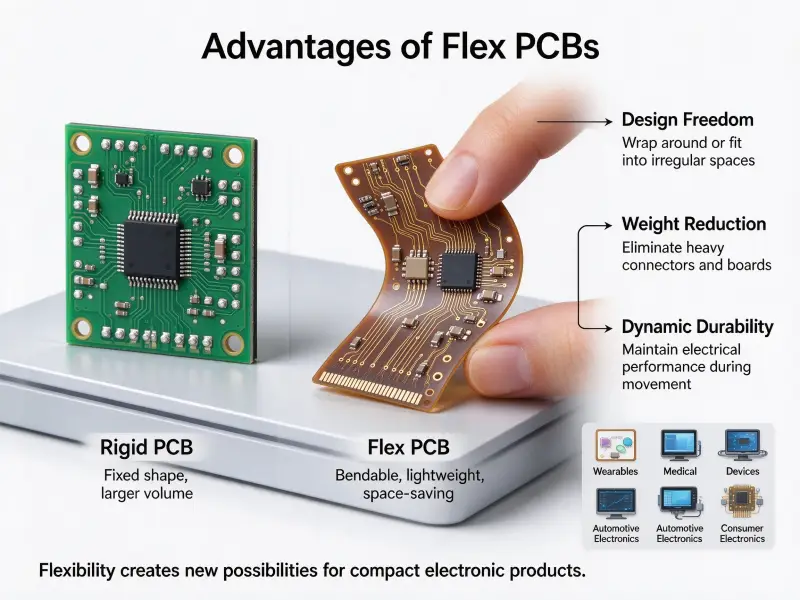
Flexible PCBs use polyimide film (Kapton) instead of rigid FR-4. They can bend, fold, and twist, making them ideal for applications where the board must fit into a curved enclosure or connect moving parts. A common example is the ribbon cable connecting a laptop screen to the motherboard; that cable is actually a flexible PCB with copper traces on a polyimide substrate.
Rigid-flex PCBs combine rigid and flexible sections in a single board. The rigid sections hold components and connectors; the flexible sections act as built-in interconnects. This eliminates connectors and cables between separate rigid boards, improving reliability and saving assembly labor. Military avionics, medical implants, and high-end smartphones all use rigid-flex construction extensively.
Specialized PCB types
Metal-core PCBs (MCPCBs) use an aluminum or copper base instead of FR-4 for thermal management. High-power LEDs generate significant heat, and an aluminum-core board conducts that heat away from the LED junction to the heat sink far more efficiently than FR-4 ever could.
Ceramic PCBs use alumina or aluminum nitride substrates for extreme thermal conductivity and low dielectric loss. They appear in RF power amplifiers, satellite communications, and high-temperature sensors. The trade-off is cost and brittleness: ceramic boards are expensive and crack under mechanical stress that FR-4 would shrug off.
Common applications of PCBs in everyday life
PCBs power virtually every electronic device in modern life. Consumer electronics, automotive systems, medical devices, industrial machinery, and telecommunications infrastructure all depend on printed circuit boards to route signals, distribute power, and physically hold components in place. The specific requirements (size, layer count, thermal performance, reliability class) vary by industry, but the fundamental role of the PCB remains the same across all of them.
PCBs are everywhere, and the range of applications keeps expanding. Consumer electronics account for the largest share by volume. Smartphones pack 8 to 12-layer HDI boards into a space smaller than a credit card. Each board routes thousands of signals for the processor, memory, cameras, radios, and sensors, all while maintaining signal integrity at multi-gigahertz frequencies.
Automotive electronics has grown from simple engine control units to complex networks of dozens of PCBs per vehicle. An electric vehicle might have separate boards for the battery management system, motor inverter, DC-DC converter, infotainment, ADAS cameras, radar modules, and body control. Each board faces harsh environmental demands: temperature swings from -40 to 125 degrees C, vibration, humidity, and electromagnetic noise from high-current motor drives.
Medical devices impose even stricter reliability requirements. An implantable pacemaker runs on a PCB that must function flawlessly for 10 to 15 years inside the human body, powered by a battery that cannot be recharged. The manufacturing standards for these boards (IPC Class 3) require far more rigorous inspection and testing than consumer-grade boards (IPC Class 2).
Industrial automation, aerospace, telecommunications, and IoT devices round out the PCB application landscape. Each domain has its set of requirements around durability, thermal performance, signal integrity, and cost.
How a PCB keeps getting better: trends in design and manufacturing
PCB technology is advancing in three main areas: smaller features using HDI and microvias, higher frequencies that require advanced materials and tighter impedance control, and embedded components that place passives and some ICs inside the substrate layers instead of on the surface. Each trend reduces board size, improves electrical performance, or both.
PCB technology is constantly evolving. Three trends are reshaping what boards can do and how they are made.
Smaller features are the most visible trend. Standard PCB fabrication routinely handles trace widths and spacings of 3 to 4 mils (0.075 to 0.1 mm). Advanced HDI processes push that below 2 mils. Laser-drilled microvias as small as 0.1 mm let designers route signals between layers without eating up board real estate. These capabilities enable the high-density packaging that modern smartphones and wearable devices demand.
Higher frequencies are the second trend. 5G wireless, automotive radar at 77 GHz, and satellite communications push PCB materials and design rules to their limits. FR-4 is not viable above a few GHz; designers turn to low-loss laminates, smooth copper foils (to reduce skin-effect losses), and precise impedance control. Even small discontinuities like a slight variation in trace width or a poorly placed via become problems at these frequencies.
Embedded components are the third trend. Instead of soldering all resistors, capacitors, and even some ICs onto the board surface, manufacturers can embed them inside the PCB substrate layers. This saves surface space, shortens signal paths (reducing parasitic inductance), and improves reliability by protecting components from environmental exposure. Embedded component technology is still more expensive than traditional SMT assembly, but the cost delta shrinks each year.

Conclusion
A printed circuit board works by routing electrical signals through precisely patterned copper traces on a non-conductive substrate, replacing the point-to-point wiring of earlier electronics with a compact, repeatable, and highly reliable platform. From smartphone motherboards with 12-layer HDI stacks to single-sided LED driver boards, the same core principles apply: copper carries current, the substrate provides structure, and the manufacturing process turns a digital design into a physical circuit that can be assembled, tested, and deployed at scale.
A printed circuit board is a deceptively elegant piece of engineering. It takes a stack of fiberglass and copper, patterned by photolithography, plated, drilled, and coated, and turns it into the central nervous system of electronic devices. The copper traces carry signals and power, the planes provide reference and shielding, the vias connect layers, and the solder mask and silkscreen make the whole thing manufacturable and inspectable at scale.
If you are designing a product that needs a PCB, the manufacturing partner you choose determines whether your design works on the first revision or goes through three costly respins. An experienced fabricator catches DFM issues before they become physical defects, recommends stack-ups that hit your impedance targets, and delivers boards that match your Gerber files within spec.
The field keeps evolving. Tighter tolerances, faster signals, and new materials open up possibilities that did not exist five years ago. If you are curious about how these advances apply to a project you are working on, the engineering team at a capable PCB facility can usually provide a free design review within a few business days.
Frequently asked questions
How many layers does a typical PCB have?
Consumer electronics often use 2 to 8 layers. A TV remote might use a single-sided board; a smartphone motherboard uses 8 to 12 layers. Server motherboards and network switches can go to 20 layers or more. The layer count is driven by signal density and the need for dedicated power and ground planes.
What is the difference between a PCB and a PCBA?
A PCB is the bare board with copper traces but no components soldered on. A PCBA (printed circuit board assembly) is the completed assembly after all components have been placed and soldered. When you order PCBA, you receive a functional circuit, not just a bare board.
Can a PCB be repaired if a trace breaks?
Yes, broken traces can be repaired. For surface traces, a technician scrapes away the solder mask over the break, solders a thin wire jumper across the gap, and covers the repair with epoxy. For inner layer breaks, repair is rarely practical; the board is usually scrapped and replaced. In critical applications, IPC standards define what repairs are acceptable and how they must be performed.