Rigid-flex PCB design is the practice of planning a single printed circuit board that carries both stiff sections and bendable ones. It shows up most often in products where a cable would be the weakest link: endoscopes, avionics, automotive cameras, and wearables. Engineers who come from rigid boards find the rules unfamiliar because the flex zone behaves like a mechanical part, not a thin board. The design decisions made before fabrication—bend radius, stackup, copper type—decide whether the board survives its first fold or fails in the field a year later.
Rigid-flex PCB design combines rigid FR-4 sections and flexible polyimide sections into one continuous board, joined at transition zones instead of connectors. The rigid areas hold components and carry current; the flexible areas fold, bend, or flex repeatedly to fit a three-dimensional shape. It differs from a plain flex PCB because it keeps rigid regions for mounting and mechanical support, and it differs from a rigid board because the flex zone replaces cables and board-to-board connectors entirely.
The sections below walk through the stackup, materials, design rules, manufacturing standards, and cost structure, in the order most teams actually make those decisions.
Rigid-flex boards are usually specified through a rigid-flex PCB manufacturer supplier that builds both material systems in-house, since not every fab can laminate polyimide and FR-4 into one panel.
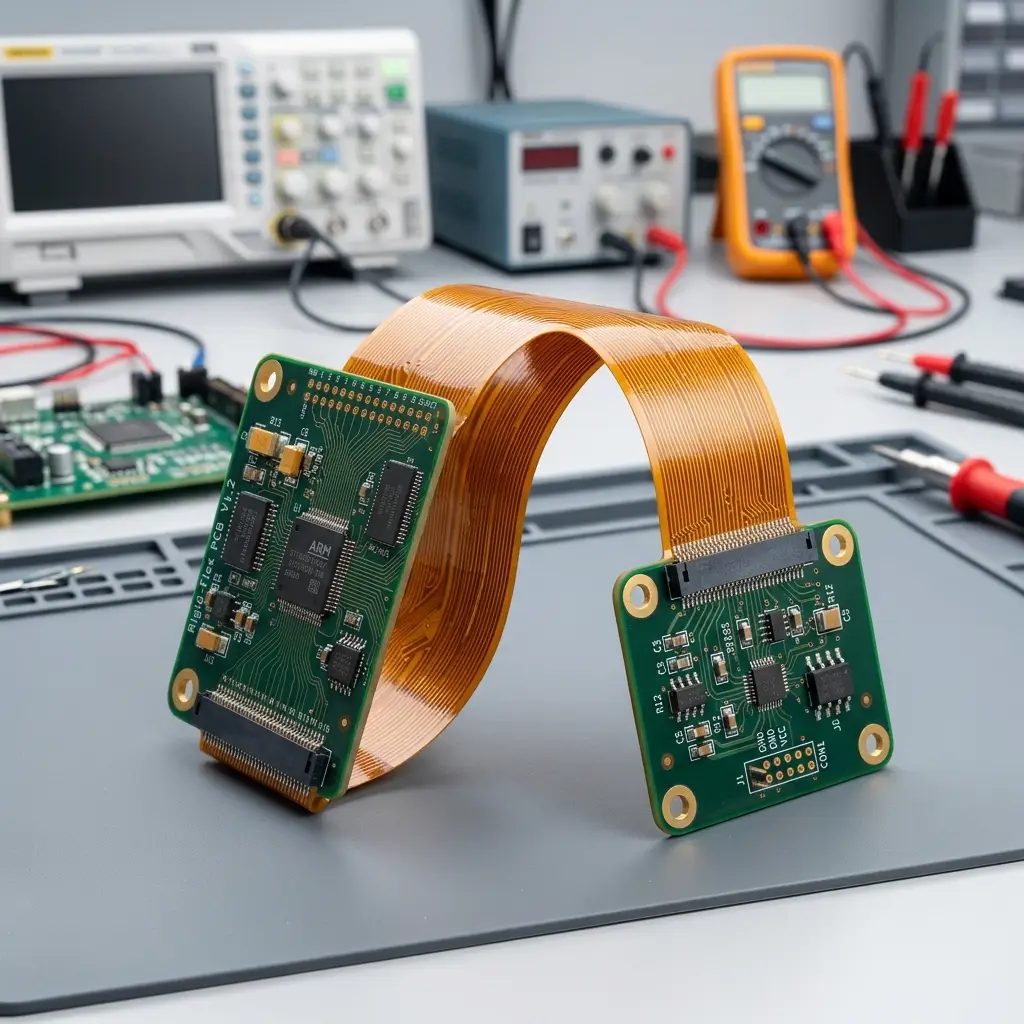
Rigid-Flex PCB vs. Flex and Rigid Boards
A rigid PCB is flat and stays flat, a flex PCB bends but has no structural support for components, and a rigid-flex PCB does both in one board. The difference that matters is the interface: a rigid-flex board moves the flexible interconnect inside the laminate, so you stop buying connectors and cables for it.
The three constructions solve different problems. Treating them as interchangeable is where most cost overruns start.
| Attribute | Rigid PCB | Flex PCB | Rigid-Flex PCB |
|---|---|---|---|
| Structure | FR-4 only | Polyimide only | FR-4 + polyimide, laminated |
| Bending | None | Continuous | Static fold or dynamic flex |
| Component support | Full | Needs stiffeners | Full-on rigid zones |
| Connectors for interconnect | Required | Required at each end | Eliminated |
| Relative unit cost | Baseline | 2–2.5× rigid, directionally | 3–5× rigid, directionally |
| Typical use | Standard electronics | Cable replacement, tight bends | Foldable enclosures, vibration, space-constrained |
Those cost multiples are directional industry ranges, not quotations—the actual spread depends on layer count, flex area, and class level, which the cost section below unpacks.
Why the combination exists
A rigid-flex board earns its premium by deleting parts. Every board-to-board connector, ribbon cable, and hand-soldered wire harness is a separate component, a separate assembly step, and a separate failure point. When a connector flexes with vibration or thermal cycling, the solder joint is what eventually cracks. Moving that interconnect into the laminate removes the joint entirely.
This is why the technology shows up in anything exposed to vibration or repeated motion. Altium’s engineering write-up on rigid-flex advantages and challenges makes the same point from the design side: fewer connectors means fewer points of failure, which is often worth more than the board cost difference over a product’s life.
It also lets the enclosure shrink. A folded rigid-flex board can occupy a fraction of the volume of the rigid board, plus harness it replaces—one reason it dominates products where every cubic millimeter counts.
Rigid-Flex PCB Stackup: How the Layers Come Together
A rigid-flex PCB stackup laminates flexible polyimide cores inside rigid FR-4 sections, with the flex layers running continuously through the bend zones and terminating in the rigid sections. The stackup has to be planned so flex layers thin out where the board bends and thicken where components mount, and so the whole build stays roughly symmetric.
A stackup is the layer-by-layer description of the board, in which copper, dielectric, adhesive, and coverlay sit where. On a rigid board this is mostly an electrical and impedance exercise. On rigid-flex it is also a mechanical one, because the flex zone’s finished thickness sets the minimum bend radius.
A typical rigid-flex stackup uses fewer layers in the flex region than in the rigid region. Flex sections often run 2–4 layers, while rigid sections run 6–10, depending on routing density. Every layer that stops at the rigid-to-flex boundary has to terminate cleanly, and those terminations create asymmetry. Asymmetry is what causes a panel to warp during lamination, so designers aim to balance copper distribution and dielectric thickness around the centerline.
The layers that matter most:
- Polyimide core—the flex substrate, typically 25 µm, stable across a wide temperature range.
- Flex copper—usually rolled annealed foil in bend zones; thickness is often kept lower than in rigid areas to improve flex life.
- Coverlay—the polyimide protective layer over flex traces, replacing the solder mask, which cracks when bent.
- Adhesive or adhesiveless bond ply—joins flex and rigid layers; material choice affects thermal reliability.
- Stiffeners—PI, FR4, or stainless, added where connectors or components need local rigidity.
Finished flex thickness must be calculated from the whole construction—core, copper, adhesive, and coverlay together—not from the polyimide core alone. Missing the coverlay and adhesive can throw a bend radius calculation off by a large margin, because those layers add real thickness.
The rigid-to-flex transition zone
The transition zone, where rigid laminate meets flex, is the highest-stress region on the board. Vias and components are normally kept clear of it. A common rule is to hold plated through-holes roughly 1.0–1.5 mm back from the flex boundary; designs that run through-vias across the boundary invite stress risers and cracked barrels.
Two construction details reduce stress at the boundary. Using a no-flow prepreg at the transition keeps resin from flowing into the bend area and stiffening it. A stepped transition—tapering copper weight and adding a fillet where the rigid section ends—spreads the strain instead of concentrating it at a sharp edge.
Bookbinder construction
In a standard multilayer flex stackup, all flex layers are bonded together and share the same length. When the board folds, the inner layers are forced around a tighter arc than the outer ones, and they buckle or wrinkle. Bookbinder construction leaves the flex layers unbonded in the bend area and steps their lengths to match each layer’s individual bend radius. The trade-off is extra tooling and assembly complexity, which is why it is reserved for tight-radius or high-cycle designs rather than applied by default.
Rigid-Flex PCB Materials and What Drives Selection
Rigid-flex PCB materials split along one line: what touches the bend zone and what does not. Flex regions use a polyimide dielectric with rolled annealed copper and a polyimide coverlay; rigid regions use standard FR-4 with electro-deposited copper. Getting the flex-side materials wrong is the most common cause of early field failure.
Material cost and material performance pull in opposite directions, so selection usually starts with the bend requirement and works backward.
| Material | Function | Typical choice | Notes |
|---|---|---|---|
| Flex substrate | Dielectric in bend zones | Polyimide, 25 µm | Stable from about -200°C to 400°C |
| Rigid substrate | Component mounting | FR-4, Tg 130–170°C | Higher Tg costs more and is needed above ~130°C continuously. |
| Flex copper | Conductors in bend zones | Rolled annealed (RA) | Higher elongation than ED, resists fatigue cracking |
| Rigid copper | Conductors in rigid zones | Electro-deposited (ED) | Fine trace definition, lower flex performance |
| Bonding | Joins layers | Adhesive or adhesiveless | Adhesiveless costs 25–35% more and improves thermal reliability. |
| Cover | Protects flex traces | Polyimide, 25 µm film | Replaces solder mask in bend zones |
| Stiffener | Local support | PI, FR4, stainless | Required under flex-mounted components and connectors |
PET is the other flex dielectric worth knowing. It costs less than polyimide but softens around 80–120°C and does not hold up under repeated bending, so it fits low-stress, low-temperature products. For anything that flexes in service, polyimide is the baseline.
Copper type and flex life
Copper foil comes in two grain structures, and the difference shows up under repeated bending. Rolled annealed copper has a lamellar grain structure aligned with the rolling direction and elongates substantially before it fractures. Electro-deposited copper has a columnar grain structure with much lower elongation; under repeated flexing, those columnar grains fatigue-crack.
The practical split follows the bend type. Dynamic flex zones—printer heads, hinged joints, and sliding mechanisms—use RA copper. Static zones that fold once during assembly can use ED copper without shortening life much. Rigid sections use ED copper for its fine trace definition.
Adhesive versus adhesiveless construction
Older flex laminates bond copper to polyimide with an acrylic or epoxy adhesive layer. That adhesive has a higher coefficient of thermal expansion than the rest of the stackup, so it expands faster under heat and pushes on the plated through-holes. Over thermal cycles, that stress can crack the barrels.
Adhesiveless laminates cast polyimide directly onto the copper foil and remove the adhesive interface. That lowers Z-axis expansion, cuts moisture absorption, and improves thermal reliability. Adhesiveless material costs more, so designs with long dynamic life or harsh thermal cycling justify it; short-life static designs often do not. Adhesive-based construction is a reasonable choice when cycle life is low and cost is the priority.
Rigid-Flex PCB Design Guidelines
Rigid-flex PCB design guidelines start with treating the flex zone as a mechanical structure rather than a thin board: classify each bend as static or dynamic, calculate the bend radius from finished flex thickness, keep vias and components out of bend areas, and route traces perpendicular to the bend line. These rules govern mechanical survival; electrical and impedance rules come second.
A useful checklist before releasing a design:
- Separate rigid and flex stackup regions are defined.
- Each bend is classified as static or dynamic.
- Minimum bend radius is calculated from finished flex thickness.
- Bend direction and installed 3D shape are documented.
- Vias and components sit outside bend areas.
- Coverlay and stiffener drawings are included.
- Copper type and thickness are specified per region.
- Impedance requirements are called out for flex routing.
Bend radius and bend type
Bend radius is measured from the inside surface of the flex section to the center of the bend. A larger radius spreads mechanical strain over more material; a smaller radius concentrates it in the copper and dielectric until something cracks. This is the single most consequential number in a flex design.
| Flex construction | Static (fold to install) | Dynamic (repeated flex) |
|---|---|---|
| Single layer | 6–10× flex thickness | 50–100× flex thickness |
| Double layer | 10–12× flex thickness | 100–150× flex thickness |
| Multilayer | 12–24× flex thickness | Generally avoided |
The difference between static and dynamic is not marginal. A double-layer flex section 0.15 mm thick needs roughly 1.5 mm of radius if it folds once and 15–22 mm if it flexes repeatedly. Designing a dynamic zone to a static radius is a common and expensive mistake.
Two habits reduce risk. Measure the radius from the inside surface, since that is where compressive strain is highest. And add 20–30% margin on top of the calculated minimum, because material tolerances and adhesive flow shift the finished thickness by roughly ±10–20 µm. Bend angles for repeated movement are normally kept at or below 90°.
Routing through the flex zone
Copper traces in a bend zone are subjected to tensile and compressive strain every cycle, so their orientation matters. Route traces perpendicular to the bend line so the bend flexes across the trace rather than along it. Do not stack identical traces directly on top of one another across multiple layers—that concentrates stress and stiffens the area like an I-beam. Stagger them instead.
Keep termination pads and plated holes away from the transition zone, and widen traces slightly in the flex area where space allows. Small changes in geometry translate into meaningful differences in flex life.
Vias, components, and keep-out zones
Plated holes are rigid local structures that cannot stretch with the surrounding flex material, so they act as crack initiation points in bend areas. The fix is geometric: keep vias out of bend zones and terminate signal layers before the bend, restarting them on the other side. This consumes board area but avoids the failure mode.
Components face the same constraint. Nothing mounts to an unsupported flex area; if a part must sit there, it needs a stiffener underneath. Placement near rigid-flex boundaries also needs care—automated pick-and-place forces can delaminate a poorly designed transition. A reasonable starting point is a 2 mm keep-out around transitions for components larger than 5 mm, with smaller passives allowed closer.
What limits a plain flex design?
A plain flex PCB has no rigid structure, so it cannot support components without help, which is the main downside compared with rigid-flex. Anything heavier than a small passive needs a stiffener bonded underneath, and stiffeners eliminate the flexibility benefit at that spot. Flex boards also have limited current-carrying capacity and no natural mounting points, so connectors have to be reinforced.
For products that only need a bendable interconnect without mounted parts, a standalone flexible PCB supplier custom FPC is usually the simpler and cheaper route. Static flex is fine for a fold-once interconnect; once a design needs mounted components, repeated flexing, or a defined 3D shape, rigid-flex becomes the more practical choice.
Rigid-Flex PCB Manufacturing and Standards
Rigid-flex PCB manufacturing laminates flex cores into rigid sections over multiple sequential lamination cycles, then drills, plates, opens coverlay windows for soldering, applies surface finish, and tests. The process needs more steps than rigid fabrication, which is why fewer fabs offer it and why unit cost is higher. IPC-2223E governs design, and IPC-6013E governs qualification.
The manufacturing sequence, in outline:
- Image and etch inner layers on flex and rigid cores.
- Laminate flex cores, using no-flow prepreg where flex and rigid meet.
- Add rigid outer layers in a second lamination cycle.
- Drill mechanical and laser holes; plate through-holes and microvias.
- Route or die-cut coverlay windows to expose rigid assembly areas.
- Apply surface finish and route the board outline.
- Electrical test, impedance verification, and microsection inspection.
Each additional lamination cycle adds registration risk. Misalignment between layers compounds, and that misregistration is what drives yield loss on complex builds—one reason layer count raises cost faster than board area does.
| Standard | Scope | Applies to |
|---|---|---|
| IPC-2221 | Generic PCB design | Whole board |
| IPC-2222 | Rigid section design | Rigid areas |
| IPC-2223E | Flexible and rigid-flex design | Flex sections and transition zones |
| IPC-6013E | Qualification and performance | Finished board acceptance |
Design and acceptance are separate documents. A design can follow IPC-2223E correctly and still fail acceptance if the purchase order does not state the right IPC-6013E class. The class sets how much testing and how many rejects are tolerated:
- Class 1—general electronics, functional performance, cosmetic defects acceptable.
- Class 2—dedicated service, balanced reliability and life; industrial, communications, automotive multimedia.
- Class 3—high performance; medical, aerospace, military. Requires flex-cycle validation and near-zero tolerance for defects.
The most common mismatch is a board designed to Class 2 and inspected to Class 3, which produces repeated prototype failures that look like manufacturing problems but are really a documentation problem. Naming both standards and the class on the purchase order prevents it.
Fabricator capability and DFM review
Not every fabricator that advertises rigid-flex can build production-quality boards. Capability varies in layer count, minimum flex thickness, bend-cycle qualification, and Class 3 testing. A fabricator that runs Class 2 consumer boards may not have the sequential lamination control or the microsection program for a Class 3 medical build.
A DFM review before tooling catches most of this. Hand the fabricator the flex stackup, finished flex thickness, bend angle and direction, static or dynamic classification, coverlay and stiffener drawings, copper type, and impedance requirements. Those details are what the fabricator uses to confirm the design can actually be built on their process—and they are far cheaper to fix at the quote stage than after tooling.
Rigid-Flex PCB Cost: What Drives It and When It Pays Back
Rigid-flex PCB cost is driven by layer count, flex area, material grade, and reliability class, not by board area alone. Rigid-flex boards run roughly 3–5× the unit cost of a comparable rigid board, with simple designs starting near 2× and high-reliability builds reaching higher. The premium usually makes sense when the design eliminates enough connectors and assembly steps to offset it at volume.
Cost scales with complexity, and layer count is the biggest single lever. Adding flex layers multiplies material cost, lamination cycles, and misregistration risk together. Consolidating signals onto fewer flex layers—running only the layers that actually need to pass through the bend—is the most effective cost reduction available.
| Cost driver | Effect |
|---|---|
| Flex layer count | Each added layer raises fab cost substantially. |
| Flex region count | Every rigid-to-flex transition adds process steps. |
| Flex area | More polyimide and larger panels |
| Material grade | High-Tg FR-4 and adhesiveless laminates cost more |
| Reliability class | Class 3 testing adds a significant premium. |
| Bend radius specified | Tighter radius forces specialized materials and tooling. |
| Panel utilization | Poor nesting wastes panel area on every run. |
| NRE and tooling | Custom fixtures and pre-baking add upfront cost. |
Several of these are design decisions rather than supplier decisions, which is why cost is largely set before the first quote. Larger bend radii let the fabricator use standard materials and tooling. Standard polyimide and standard FR-4 cover most applications below roughly 130°C continuous operation; exotic dielectrics are only needed for specific high-frequency or high-temperature requirements. Adhesiveless laminates pay off when flex life is high but are not worth the premium for static, low-cycle designs.
Where the savings offset the premium
The comparison that matters is not board versus board—it is system versus system. A rigid-flex board replaces a rigid board plus connectors, ribbon cables, and the labor to assemble them. Those line items disappear from the bill of materials and the assembly schedule.
The savings come from several places at once: connectors that are no longer purchased, assembly labor for harnesses that is no longer performed, testing that no longer needs to verify connector integrity, and defects from connector and cable handling that no longer occur. At low volumes, the rigid-flex unit premium dominates, and the design may not pay off. Past a threshold—commonly in the thousands of units—the deleted components and labor can offset the board premium, and the reliability gain is additional.
The honest way to evaluate it is to build the comparison from your own numbers rather than a rule of thumb. Collect the connector and cable cost per unit, the assembly labor per unit, the current field failure rate tied to interconnects, and the expected annual volume, then compare total system cost rather than unit board cost. Where field service is expensive—medical devices being the clearest case—even a modest reduction in interconnect failures can justify the premium on its own.
Where Rigid-Flex PCB Design Is Used
Rigid-flex PCB design fits products that face space constraints, weight limits, vibration, or repeated motion, where a cable would be a weak point. Medical devices, aerospace systems, automotive electronics, industrial sensors, wearables, and folding consumer products are the main categories. The technology is the wrong choice when the board never moves and connectors have room to sit.
Application and design driver line up closely:
| Application | Primary driver |
|---|---|
| Medical devices | Miniaturization, reliability, disinfectant resistance |
| Aerospace and defense | Weight, vibration resistance, Class 3 reliability |
| Automotive | Vibration, thermal cycling, compact camera and sensor modules |
| Industrial sensors | Harsh environment, repeated motion |
| Wearables and folding devices | Space, weight, dynamic flex life |
| Consumer electronics | Enclosure height, assembly simplification |
Rigid-flex is the wrong answer in a few clear cases. If the board bends once and stays fixed, a static flex cable or a rigid board with a connector often costs less. If two rigid boards sit close together with room for a connector between them, the connector is simpler. And if there is no dynamic flexing, vibration, or volume constraint, the premium buys little.
The technology earns its cost by removing connectors, cutting assembly steps, and shrinking the enclosure. When a design does none of those three things, a rigid board or a plain flex is the better choice.

FAQ
How many layers can a rigid-flex PCB have?
Rigid-flex stackups typically run 4 to 12 layers, with flex sections carrying fewer layers than rigid sections to keep the bend zone thin. Builds beyond that are possible, but cost climbs quickly, because each lamination cycle compounds registration risk and reduces yield. Most designs resolve to 2–4 flex layers and 6–10 rigid layers.
Can components be placed on the flexible section of a rigid-flex board?
Only with a stiffener bonded underneath, and that stiffener removes the flexibility at that spot. In practice, components sit on rigid sections, and the flex zone carries interconnects. Parts placed within roughly 2 mm of a rigid-to-flex transition risk damage from pick-and-place forces and reflow stress during assembly.
Does a rigid-flex PCB need a different surface finish than a rigid board?
The flex zone needs a finish that survives bending and does not embrittle, which is why coverlay rather than solder mask protects flex traces. Rigid sections follow the usual options—ENIG for reliability, OSP or HASL for cost-sensitive builds. Immersion silver and selective hard gold appear where contact wear or fine-pitch assembly calls for them, and the choice is specified per region rather than across the whole board.