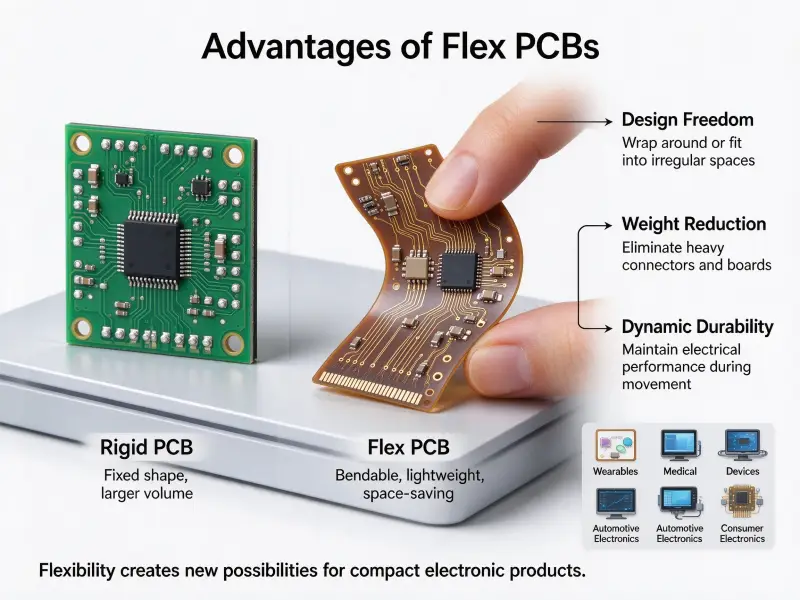
Every hardware program reaches the point where a schematic and a simulation stop being enough. The next step is a prototype printed circuit board: a small quantity of real boards built so the design can be measured, handled, and stressed before anyone commits to production tooling. Buyers running that step usually share the same concerns. How many boards should they order? Which printed circuit board material fits the application? Which prototype printed circuit board manufacturing route gets a working unit into their hands soonest without hiding defects? Teams that treat custom PCB manufacturing as a design activity rather than a purchasing transaction tend to find their problems earlier, while fixing them is still cheap.
A prototype printed circuit board is a limited run of boards fabricated from a design that is still expected to change, built to validate electrical performance, mechanical fit, and assembly feasibility before volume production. Prototype printed circuit board manufacturing runs through the same core processes as production, including imaging, lamination, drilling, plating, etching, and surface finishing, but it prioritizes engineering feedback and short lead time over unit cost. The prototype printed circuit board assembly then places and sows the components so the board can be tested as a functioning module instead of a bare substrate.
The rest of this guide follows that sequence, from the design files that open a prototype order to the handoff that closes it.
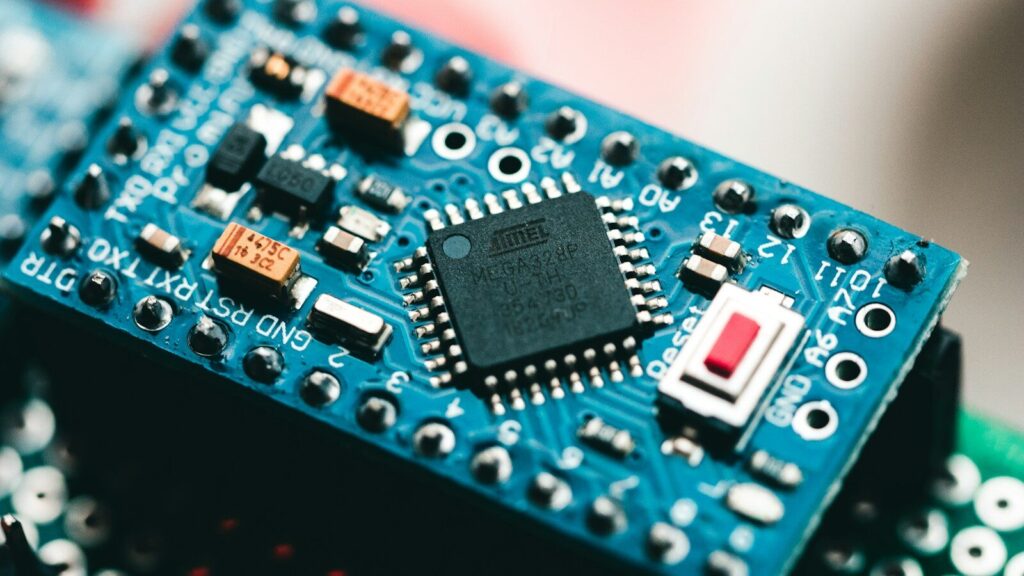
What is a prototype printed circuit board?
A prototype printed circuit board is a functional board produced in small quantity from a design that has not yet been proven. It exists to answer questions that documentation and simulation cannot: whether the routing holds up electrically, whether the components fit the mechanical envelope, and whether the board can be assembled at the required quality level. A prototype is not a scaled-down production board. It is a different deliverable with a different acceptance standard.
The distinction matters because it changes how the board should be specified. A production board is judged on repeatability and yield across thousands of units. A prototype board is judged on how much it teaches the design team. That difference runs through quantity, panelization, documentation, and what counts as an acceptable result.
How a prototype board differs from a production board
| Dimension | Prototype board | Production board |
|---|---|---|
| Quantity | A few units to a few dozen, enough for bench testing and a pilot build | Thousands to millions |
| Design status | Still expected to change once results come back | Frozen and released |
| Process goal | Prove design intent and gather engineering feedback. | Repeatability, unit cost, and yield |
| Panelization | Simple breakout, often tab-routed for easy separation | Optimized for material utilization |
| Assembly scope | Partial or full build, rework expected | Full build with locked process parameters |
| Acceptance standard | Function and testability matter most. | Full workmanship and reliability criteria |
| Main cost driver | Engineering time and setup | Material, labor, and cycle time |
Where prototypes sit in the development cycle
Most hardware programs run three stages before volume production.
- Engineering validation. The first working boards confirm that the circuit functions at all. Cuts, jumper wires, and rework are normal, because the goal is to prove the concept rather than to pass inspection.
- Design validation. The design is close to final. The prototype is used to check signal behavior, thermal performance, connector fit, and assembly quality against the released specification.
- Pilot production. A small run is built with production intent, using the real panel layout, the real fixtures, and the real process parameters, to find manufacturing problems before the full release.
Each stage needs a different board. Sending a first-article design straight onto a pilot line wastes money, and using a pilot build to debug a schematic wastes schedule.
Why prototype printed circuit board fabrication pays for itself
Prototyping pays for itself because it moves discovery earlier. A change caught while the layout is still open costs engineering hours. The same change caught after stencils, fixtures, and assembly tooling exist costs all of those items a second time, plus the schedule slip that follows. The value of a prototype is not the boards themselves. It is the information they produce.
Catching design errors before tooling
The expensive part of a late change is the chain of dependencies behind it. Moving one connector can force a new stencil, a new test fixture, a new cable assembly, and a repeat of the enclosure fit check. None of those costs appear in the board price, which is why comparing prototype cost against unit price misses the point. The useful comparison is prototype cost against the cost of one full respin, including the engineering hours and the delayed launch.
Validating material, stackup, and assembly choices
Simulation can model an ideal stackup. It cannot tell you how the chosen laminate behaves at reflow temperature, whether the surface finish still solders cleanly after months in storage, or whether a fine-pitch footprint is actually placeable on the equipment available. A prototype turns those assumptions into observations, and observations are what a design review needs.
Prototype printed circuit board manufacturing, step by step
Prototype fabrication follows the same path as production fabrication, with review and rework built into it. The job starts with design files, moves through imaging and lamination, and then through drilling, plating, etching, and finishing. At every stage the goal is the same: turn a data package into a board whose electrical behavior matches the design intent.
Design files and pre-production review
A prototype order begins with a data package. Most suppliers want a Gerber set or an equivalent fabrication format, a drill file, a layer stackup, and a bill of materials. The review that follows looks for problems that are hard to see inside the CAD tool: copper too close to the board edge, a drill overlapping a pad, a silkscreen legend sitting on a solder pad, or a stackup that cannot be laminated as drawn. Catching these in review costs an email. Catching them on a finished panel costs a rebuild.
Imaging, lamination, and drilling
For a multilayer board, inner layers are imaged, etched, and inspected, then stacked with prepreg and copper foil and laminated under heat and pressure. Layer-to-layer registration is the main risk, because a small shift becomes a misregistration. After lamination, holes are drilled using X-ray targets to align the drill program with the inner-layer pattern, which is why registration accuracy is checked before drilling rather than after.
Plating, etching, solder mask, and surface finish
The remaining steps build the outer circuitry and protect it. Each stage has a purpose and something worth confirming on a prototype.
| Stage | Purpose | What to confirm on a prototype |
|---|---|---|
| Outer layer imaging | Transfer the outer circuit pattern onto the panel. | Trace and clearance dimensions match the design. |
| Copper and tin plating | Build plated copper in the holes and protect the traces. | Hole wall coverage is adequate |
| Etching | Remove unwanted copper, leaving the conductors. | No undercut or shorted traces |
| Solder mask | Insulate the surface and prevent solder bridging. | Mask clearance around pads is correct. |
| Surface finish | Keep copper solderable and protect it in storage. | Finish suits the assembly process and storage window. |
| Silkscreen | Print reference designators and polarity marks | Legends do not sit on pads. |
| Profiling | Cut the panel into boards or a breakout panel. | The board outline and tab positions match the fixture. |
Printed circuit board material and design choices that set prototype cost
Prototype cost is driven by a short list of decisions: the base material, the layer count, the copper weight, the smallest trace and hole dimensions, and the surface finish. On paper these look like free choices. In fabrication they are the difference between a routine build and a difficult one. Knowing where a design sits relative to common process windows is the most useful cost exercise a buyer can do before requesting a quote.
Base material and layer count
Rigid FR-4 is the default laminate for most prototype work and covers a wide range of digital and analog designs. It is not always the correct answer. High-temperature environments push designs toward laminates with a higher glass transition temperature. Repeated flexing or extreme thermal cycling points to polyimide. Applications where heat has to leave through the board point to metal-core constructions. High-frequency circuits often need a laminate with a tightly controlled dielectric constant rather than a general-purpose material.
Layer count should follow the routing and the power delivery requirements, not the other way around. A two-layer board with a well-planned ground strategy can outperform a poorly planned four-layer stack. When the layer count does rise, the increase usually comes from controlled impedance, dense component fanout, or the need for dedicated power and ground planes. Industry standards such as the generic standard on printed board design from IPC set baseline requirements for material selection and conductor spacing, which is useful when a specification has to be defended to an auditor or a customer.
Copper weight, trace width, and hole size
Copper weight and trace width are tied together. A trace carrying more current needs more cross-sectional copper, which means either a wider trace or a heavier copper layer. Heavier copper is a real cost step, because it changes how the panel etches and often requires adjusted trace spacing. The same logic applies to holes. Small holes in a thick board create a high aspect ratio, and high aspect ratios are harder to plate reliably, so the drill program and the stackup should be decided together.
Surface finish selection
| Finish | Best suited to | Consider |
|---|---|---|
| Hot air solder leveling, leaded or lead-free | General-purpose through-hole and mixed assembly | Surface flatness is limited for fine-pitch parts. |
| Immersion gold | Fine-pitch SMT, long storage, some wire bonding | Higher cost; the nickel barrier affects high-frequency loss. |
| Immersion silver | High-frequency and fine-pitch work | Sensitive to handling and storage conditions |
| Immersion tin | Press-fit and some SMT processes | Short storage window |
| Organic solderability preservative | Cost-sensitive builds with a short assembly timeline | Repeated reflow cycles can degrade it. |

Prototype printed circuit board assembly
Prototype assembly turns the finished bare board into a working module. It covers stencil printing, component placement, reflow, through-hole insertion where needed, inspection, and rework. At the prototype stage the deliverable is a board that can be measured, so the process has to be traceable and reworkable rather than fully optimized for speed.
SMT, through-hole, and mixed assembly
Most modern prototypes are surface-mount builds, sometimes with a few through-hole parts for connectors or power components. A mixed build runs the SMT side first and adds the through-hole parts afterwards, which keeps high-temperature reflow away from components that cannot take it. Deciding this split early matters, because it sets the stencil design, the order of operations, and which parts are exposed to the highest thermal load.
Stencil, pick and place, reflow, and rework
The stencil controls solder paste volume, and paste volume drives most solder defects, so stencil design deserves more attention than placement programming on a first build. Placement accuracy matters most with fine-pitch packages, where a small offset can bridge adjacent leads. Reflow follows the profile the paste supplier publishes, adjusted for the thermal mass of the board and the density of copper underneath the parts.
For prototype work, turnkey PCB assembly is often worth the cost because it keeps fabrication, component sourcing, and assembly under one process owner. When a board fails, the question of whether the fault came from the board, a component, or the soldering process is easier to settle when one team saw all three stages.
Inspection and test on a prototype run
Inspection should match the risk rather than being copied wholesale from a production flow.
- Automated optical inspection catches missing parts, misalignment, polarity errors, and visible solder defects.
- X-ray inspection looks through ball grid arrays and other bottom-terminated packages where joints cannot be seen.
- A flying probe or fixture-based electrical test verifies continuity and isolation and can confirm nets on an assembled board.
- Functional test runs the board through its real operating conditions, which is the only test that answers whether the design works.
How are PCBs connected? Board-to-board and flexible interconnects
PCBs are connected in one of three ways: by soldering one board directly to another board or to wires, by mating a connector pair across two boards, or by running a flexible cable or flexible circuit between them. The right choice depends on whether the joint has to survive repeated mating, how much space is available, and whether the signal tolerates the added impedance and length that a connector and cable path introduce.
How are PCBs connected?
For a permanent joint, the two boards can be soldered through a rigid header that also sets the spacing between them. For a serviceable joint, each board carries half of a mating connector pair, so the boards can be separated for repair or upgrade. For a joint that has to tolerate movement or a tight envelope, a flat, flexible cable or a flexible circuit carries the signals while the mechanical compliance lives in the cable. Power and ground usually take the shortest and most direct path available, while high-speed signals need an impedance-controlled path and a defined return path.
What are FFC and FPC connectors?
FFC connectors accept flat, flexible cables, which are standardized laminated ribbons of parallel conductors bonded between insulating films. FPC connectors accept flexible printed circuits, which are etched circuits built on a flexible substrate. They look similar at a glance and are frequently confused, but they are different products.
| Property | FFC | FPC |
|---|---|---|
| Construction | Parallel conductors laminated between films | Copper traces etched on a polyimide film |
| Shape | Straight, point-to-point only | Branching, irregular outlines, multilayer routing |
| Tooling | Low or no non-recurring engineering cost | Photomasks and custom lamination tooling are required. |
| Components on the flex | Not possible | Possible |
| Impedance control | Not usually available | Achievable with ground reference planes |
| Bending life | Limited under repeated flexing | Long life with rolled copper and engineered bend radii |
| Typical use | Board-to-board and board-to-display jumpers | Space-constrained and dynamic connections |
The two are not interchangeable in the same connector. The contact structures differ, and forcing a mismatch leads to poor contact rather than an obvious failure, which is why pitch, pin count, and stiffener specification are all checked together.
The three types of connectors buyers should know
Most connector families fall into one of three groups.
- Board-to-board. Both halves mount on boards and mate directly. Mezzanine connectors, headers and sockets, and edge connectors where a gold-fingered board plugs into a slot all belong here.
- Wire-to-board. The connector terminates a discrete wire or a cable and mounts on the board. This is the usual choice when a board has to reach a panel, a sensor, or a power supply through a harness.
- Wire-to-wire. Both halves terminate conductors with no board involved. Inline and splice connectors sit in this group.
Flexible interconnects run alongside these groups rather than inside them. An FFC or FPC with a zero insertion force connector is still a board-to-board connection, but it moves the compliance into the cable.
How to connect two PCBs together
| Method | When it fits | Watch for |
|---|---|---|
| Mating connector pair | Boards are assembled or serviced separately; stack height is defined. | Mating cycles, polarization, blind-mate tolerance |
| Pin header and socket | Low-cost board-to-board in a fixed stack | Height variation and long-term contact wear |
| Edge connector | One board plugs into a slot on the other or into a backplane. | Gold finger plating and board thickness tolerance |
| FFC or FPC with a ZIF connector | Thin, space-constrained, or moving connections | Open the locking lever fully before inserting the cable. |
| Direct soldered header | Permanent, low-profile, high-vibration joints | Rework is difficult. |
| Wire harness | The distance between boards is significant. | Strain relief and routing discipline |
Ordering a prototype PCB: files, questions, and handoff to production
A prototype order is only as good as the data package behind it. Suppliers quote from files, and every missing parameter becomes an assumption that someone else makes on your behalf. Sending a complete package and asking a small number of process questions before the build starts prevents most of the surprises that turn a one-week prototype into a three-week rebuild.
What to send for a quote
| Item | Why the supplier needs it |
|---|---|
| Gerber or equivalent fabrication data | Defines the copper, mask, and silkscreen artwork |
| Drill file | Defines hole positions, sizes, and which holes are plated |
| Layer stackup | Sets material, dielectric thickness, and copper weight |
| Board outline and dimensions | Drives panelization and material utilization |
| Solder mask and surface finish specification | Determines cost and assembly compatibility |
| Quantity and target schedule | Sets the fabrication route |
| Bill of materials | Enables component sourcing and kitting |
| Pick-and-place data | Drives placement programming and orientation checks |
Questions that prevent a respin
- Is the stackup buildable as drawn, and if not, what changes with the least electrical impact?
- Does any net require controlled impedance, and has that requirement been captured in the fabrication data?
- How will the boards be separated, and does the breakout leave the routed edge in the intended condition?
- What acceptance criteria will be applied to the bare board and to the assembled board?
- Are there single-source components in the bill of materials that need an approved alternative?
From prototype to production release
Moving a proven prototype into production is a data exercise, not a formality. The panel layout changes, the number of boards per panel changes, and the fixture probably changes with it. Any of those can alter how a feature etches or how a part sits, which is why a pilot run is used to confirm that the production process reproduces what the prototype demonstrated. Change records should carry the reasoning behind each revision, because the next engineer who opens the project will need to know which assumptions were tested and which were not.
FAQ
What is the difference between a prototype PCB and a breadboard or evaluation board?
A breadboard is a reusable platform for wiring a circuit without soldering, and an evaluation board is a vendor-built board that demonstrates a specific component. Neither reproduces the copper geometry, stackup, or solder process of your final design. A prototype printed circuit board is fabricated from your own data package, so it tests the routing, the footprints, the thermal path, and the assembly process at the same time, which is what makes it a design validation tool rather than a convenience platform.
Do prototype boards need conformal coating?
Only if the product will need it. Conformal coating protects against moisture, dust, and contamination, but it also blocks rework and makes probe access harder. On an engineering validation build, the coating usually gets in the way. On a design validation or pilot build that will be subjected to humidity or salt spray testing, applying the coating early exposes adhesion or coverage problems before they become a production issue. The decision should follow the test plan, not habit.
How should prototype boards be stored before assembly?
Storage is decided by the surface finish, because solderability degrades at different rates depending on the finish and the environment. Boards finished with an organic solderability preservative have the shortest practical window, while gold and silver finishes tolerate longer storage but are sensitive to handling and to airborne contaminants such as sulfur. Sealed packaging with desiccant and a humidity indicator, plus handling in gloves and grounded packaging, covers most of the risk. Boards stored beyond a supplier’s stated window are best re-qualified with a solderability check rather than used on the assumption that nothing changed.